Showing posts with label Differentiation. Show all posts

Tuesday, April 15, 2014

Small Group Google Form Request and Spreadsheet


I'm linking up this post up at Head Over Heels for Teaching and her Spark Student Motivation Saturdays, because I got very positive feedback from my students when I let students request small group intervention via a Google Form


I'm home today with a sick boy and am finally blogging about something I did in my class last week that far exceeded my expectations.  I didn't take any photos while doing this and I'm home today so perhaps I will update this post later with more photos, but everything is at school and I'm home today.  The main focus of this post is the Google Form and Spreadsheet I used.  I had a last minute idea, the stars aligned, and when I called my tech coach he had a few minutes available to help turn my idea become reality.

I spend lots of time pulling small groups for mini-lessons or conferring about formative feedback I get via entrance/exit slips.  Last week we had a MATHia day prior to our Chapter 10 Assessment on Triangles.  Students had the option to work on the computer or request extra practice/small group instruction on various concepts being assessed the next day.

With the assistance of the best teach coach ever @chadkafka I created the google form shown below where students could sign up for some extra practice/discussion any concepts they felt they still hadn't mastered.  I created a google shortcut for students to access the google form.  This form seriously took me about 10 minutes to create. If I can do it anyone can.  Really, the creation is a fairly intuitive process. Interested students completed the form and I had instant data on who I would be working with during math class/ Core Plus that day.


If you click to picture below you can see the results of my form.  It was so easy to see everything in one place in Google Drive.  I hid the student name column so I could post this for you to view.  That would be located directly left of the class hour.  I ended up using the purple shading because I had students in 6th hour that were separated and I was not able to sort them by class hour because the sorting feature was being problematic the day I was using this.

Google Form results allowed me to form small groups.
I do like the idea of shading the box (dark purple) once the student has completed a learning station/small group lesson on a concept so I can keep track of who has completed what. There was a lot of different things going on at once based on student request.  I also keep notes in the last column if students worked on this during Core Plus or Class.  I love having this data to refer back to and also to inform parents if students are taking advantage of these added opportunities or not.

This worked so well for me.  I did a post about the three Learning Stations I created last year.  I had students use these to practice independently after I modeled for them how the station worked.  I wrote the answers on a post-it on the back to the center and gave the student the sheet protector with the card in it.  Students really enjoyed using these to review for the assessment.  They checked in with me after completing the station and most were able to solve for a missing angle x using the concepts of either the triangle sum theorem or exterior angle theorem.  I'm posting the photos below because they are saved on my computer from when I created the stations last year.

Each color is a different station

Direction sheet.

Each station had six cards.  I also attached the answer key on the back of the white sheet. The cards were actually on the other side of the sheet protector when I handed them out. 

I also made worksheet that had two different triangle constructions for students to practice.  The constructions have been really challenging for many of my students.  While many have mastered how to construct a triangle using given sides or angles, many still struggle.  If students just wanted more practice they worked on this independently, but many preferred to have me model the construction for them in a small group.  During mini lesson time in workshop I use the SMARTboard compass to construct triangles.  Some students prefer watching me use a real compass to do the construction step by step while they complete their own construction.

The last three concepts, determining congruence in triangle, determining possible side lengths for the third side of a triangle when two are given, and whether three side lengths would form a triangle, were all done in small groups with me using whiteboard examples and lots of discourse.

What I loved about using the Google Form for students to request small group lessons was the ownership it put on the students.  This gave every student access to work on concepts they still felt they needed more work on.  I pull small groups all the time, but usually I use entrance/exit slip data to determine the groups.  This gave students choice and voice in what they still needed/wanted to practice prior to the assessment.

I will definitely be using Google Forms more frequently to get feedback from students.  I would also like to create some entrance/exit slips on a form.  I will be sure to share on the blog anything else I do.  Let me know if you have any questions and I definitely recommend you try making a Google Form yourself.  It's so easy having the data collected on a Google Spreadsheet could not be easier to view!

Friday, February 14, 2014

Small Group Lessons on Two-Step Equations

We started our unit on two-step equations and inequalities last week.

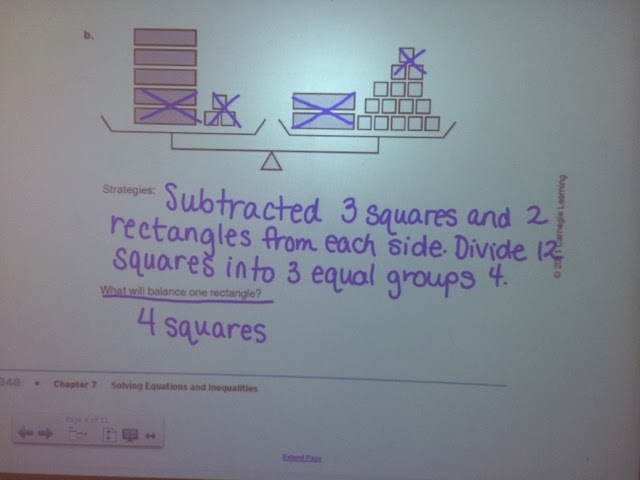
Day 1 Lesson was "Picture Algebra"


Day 2 Lesson was "Solving Equations"


On Friday my students had a MATHia Day where they spend the 60 min class working on the computer.  I gave the students this entrance slip as a warm-up.


While they were working on the computer I sat and graded the slips and started forming small groups for lessons on two-step equations.  I also have a class everyday day called Core Plus (different students on A/B days) which I use for intervention when students need it.   Core Plus meets right before lunch so I had my students from afternoon classes complete the slip.  I then started pulling small groups that day.  It's so helpful when I can get a jump on things during Core Plus because then those afternoon students can be more independent during class or MATHia and I can focus my efforts on the students who need help, but are not in my Core Plus.

Monday was another MATHia day and after the warm-up and a 5 minute mini-lesson modeling a MATHia problem I began pulling small groups.  I have a table in the back (or front depending on how you look at it) of the room where I can pull small groups of students. I pulled groups of 2-5 depending on what students needed help with.  I really need one more chair because I only have 5 chairs total and I use one of them.  I do have stool that kids love to sit on so that can be pulled over if a group is bigger than 4.


I started with students who showed the most mastery, but just needed little reminders on properly setting up equations and showing work.

I feel sometimes my time gets monopolized by the same handful of students who need more intervention time and I knew that the mini-lessons for the students who already show more mastery would go quickly so I started with them first.

I loved the conversations I had with the groups that were focusing on the higher level problems of having to first distribute and then solve the equation when there were variables on both sides.  We hadn't really done a problem like that yet and several students figured it out.

I was busy right up until the bell rang in every class.  I loved doing the small group lessons because once again I am getting a very good feel for where each individual student is at with their two-step equation solving.  I made some notes on students' slips when a few times I felt a student still needed more practice to become more fluent in their equation solving.


It was really easy to look at the students' slips and group them into small groups just by visually seeing their mistakes.  I would call the groups to the front table and each student had a dry erase board, marker, and erasing cloth.  Students had the option to work on their entrance slip or the dry erase board and they overwhelmingly chose to work on the dry erase board.

As a group was working each student would hold up their board as they completed a problem.  I could quickly scan the board and point out any errors or let them know it was perfect and they could move on the next problem.  Once a was satisfied (and they agreed) they were understanding the equation solving they went back to and worked on the computer.

Wednesday, March 20, 2013

Entrance/Exit Slips

I have been using exit slips in my class more frequently and I am really loving them for a quick and easy formative assessment of students' understanding.  I really should call them "Entrance Slips" because I tend to use them in place of a warm-up the day after teaching a lesson.  We have 60 min classes, but I rarely have time to give an exit slip and prefer instead to let students start their homework assignment with any time left at the end of class.

If I use them as "entrance slips" I have them on student desks prior to class starting or I hand them to students as they enter my room.  The slips are designed to only take 3-5 min to complete.  Students complete the slip while I walk around the room stamping homework.  There is also an answer key projected on the SMARTBoard with assignment answers so students begin correcting the assignment once they have handed in the exit slip.


One of the things I really like about using the exit slips is that I choose the questions to write.  I have found this is a great way to get at students misconceptions, like question 4 above.  Quite a few students forgot that lines are infinite so you can't have one longer than the other despite what the drawing looks like.  My students also liked having the slips as an additional review tool for assessments.


 I have used the exit slips to form small groups for mini lessons.  I've gotten very positive feedback from my students about working in a small group focusing on only what they need.  They really appreciate not having to go through concepts they've already shown they mastered via the exit slip.  The exit slips give me a much better handle what concepts each individual student has mastered and what they need more instruction on.


I find I am able to check the exit slips very quickly so I can do same day feedback if I have time.  In the picture above, I created a checklist of the skills the students did not get correct on the exit slip.  The squiggly lines mean that student mastered everything on the slip.  I am able to see trends in students and even classes.  This allows me to customize my instruction and small groups to meet the needs of each individual learner.

Entrance/Exit slips are a very powerful formative assessment tool that you can use as a teacher to get lots of information very quickly.  My ultimate goal is to create learning stations for the concepts I am assessing and then if students need more practice they can either get a mini lesson from me on it or they can work individually, in partners, or small groups to work through the learning station.

Do you use exit slips in your classroom?  If so, how do you use the data you collect to drive instruction?  If not, I highly recommend you start using them.  It will take some work up front to create the exit slips, but I promise they are well worth your time and effort.


Wednesday, February 27, 2013

Creating a Learning Station

I have done several previous posts about Learning Stations.  This post is to show you how easy it is to create a learning station in place of just having students fill out a worksheet.  It's nothing fancy and I created this learning station in just a few hours on a Sunday afternoon.

I started with creating an exit slip for a lesson I had taught on Triangle Sum, Exterior Angle, and Exterior Angle Inequality Theorems.  I made this a brief three question exit slip.  I then created a station for each of the learning goals being assessed on the exit slip.  The exit slip was quick and easy to grade and based on what answers students got wrong (and what the mistake was they made) I will assign students to the stations.

Exit Slip
 There are three different stations and each has six questions.  Are you curious to know the secret to this easy station creation?  I just took problems off a skills practice worksheet and put them on index cards numbered 1-6 and then laminated the cards.  Believe it or not, the students are much more engaged in doing this skill practice because they get to move from station to station, the questions are differentiated based on what their needs are, and most importantly, they aren't completing what they consider to be a boring worksheet.  You can decide how many question each students completes per station.  I

Station 1

Station 2

Station 3
 I really wanted to find some clear picture frames to hold the station directions, but the last time I was at the Dollar Store I could not find any so I improvised and just used a plain old sheet protector.  The sheet protectors make it easy to store the stations in a three ring binder.

All three stations fit in a binder for easy storage


Sheet Protector storage
You can store the index cards on in the back side of the sheet protector.

Back side of same sheet protector above holds cards for storage
I hope this post inspires you to try to switch things up and turn a simple skill review or remediation activity into a learning station that students will find more engaging.  I would love for you to leave a comment linking any station activities you have done in your own classroom.  My 7th graders love any activity that allows them to get up and move around the classroom while learning.